How to Join
play.brico.dev Setup Guide
Welcome! Here’s everything you need to get in.
Step 1: Install Java 25
Minecraft 26.1.2 requires Java 25. Install it before launching the game.
Download the installer for your system:
- Eclipse Temurin 25 (Adoptium) — recommended, free, simple installer
- Or: Oracle JDK 25
Run the .msi installer and follow the prompts. Done.
I already have an older Java version — will it conflict?
No. Multiple Java versions can coexist on Windows without interfering. Just install Java 25 alongside whatever you already have.
If something still launches with the wrong Java after installing, you can uninstall the older version from Settings → Apps. In most cases this isn’t needed.
Step 2: Get Minecraft Java Edition
You need Minecraft: Java Edition (not Bedrock). If you don’t have it, you can download a cracked Minecraft launcher either from SKLauncher or TLauncher (any will do).
I would recommend SKLauncher over TLauncher
[Option A, recommended] SKLauncher
- Download SKLauncher
- Choose
Fabric 26.1.2. Fabric is for mods, and still worth to have if you don’t want mods.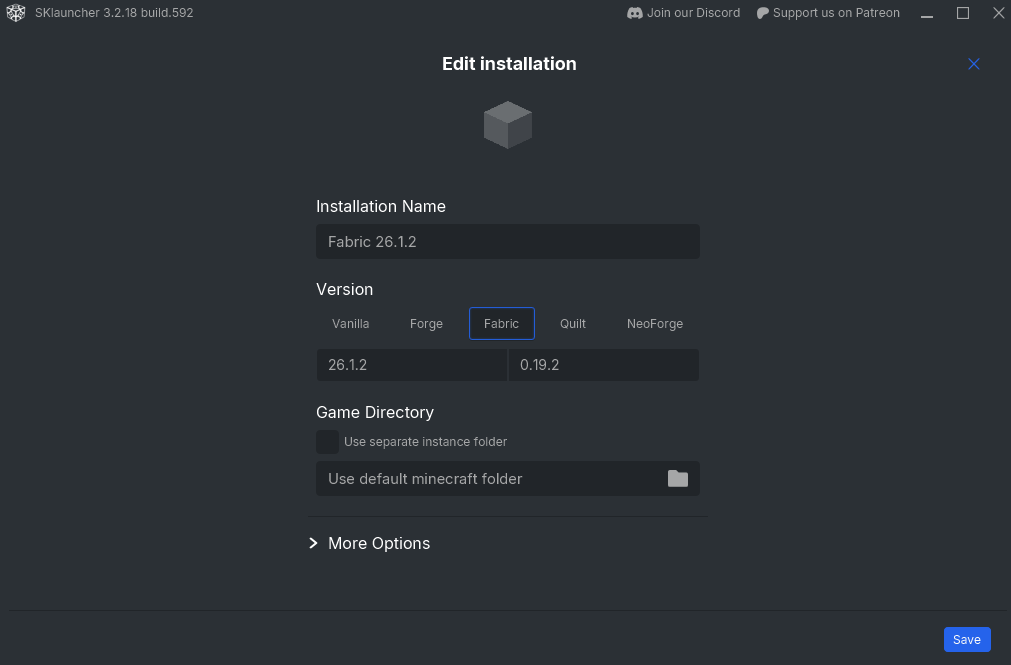
- Launch Minecraft
[Option B] TLauncher
- Download TLauncher
- Choose
Fabric 26.1.2. Fabric is for mods, and still worth to have if you don’t want mods.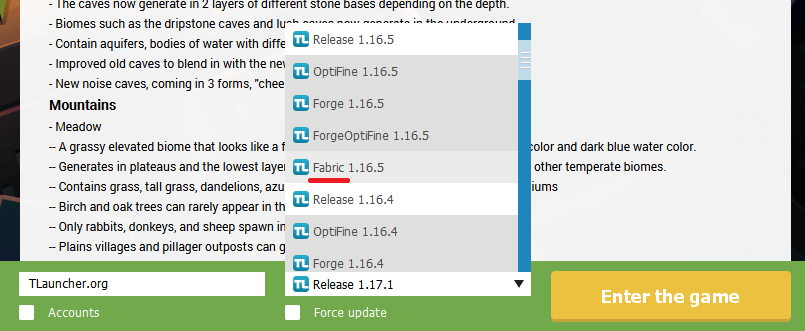
- Launch Minecraft
If you need help setting it up, just ask in the group chat.
Step 3: Mods, Voice Chat and others
Make sure Minecraft is already launched. You can close it in this step.
- Go to the
modsfolder of your Minecraft installation- SKLauncher and TLauncher have a button to open the installation folder in File Explorer
- Put the following mods in the
modsfolder. Choose either option A or B- You don’t need to install it. Just put under the folder
[Option A] Stripped down, only what you need
GDrive download link. It includes:
- Fabric API mod
- Simple Voice Chat (the server has built-in proximity voice chat — you’ll actually hear your friends in-game)
[Option B] Complete with other optimization mods
GDrive download link. It includes:
- All mods in the stripped down version
- Lithium (performance optimization)
- Sodium (performance optimization)
- Iris Shader (if you want shader, you need this mod)
Step 4: Add the Server
- Open Minecraft and click Multiplayer
- Click Add Server
- Paste the Server IP shown above
- Click Done, then click the server to join
Step 5: Create Your Password
The server protects your username with a password. You’ll need to set one on your first join.
First time only — type this in chat:
/register YourPassword YourPasswordEvery time you join after that:
/login YourPasswordWe have sessions, so you won’t need to type it every single time.
Questions?
Just drop a message in the group chat. See you on May 8th. 🎉